Customer-ready demo package

Wolfram Engine GPU Telemetry Demo

A Qt dashboard that uses Wolfram Engine locally as the calculation engine for GPU telemetry health analysis.


ESL Engineering Software Lab logo Wolfram homepage screenshot
What the customer sees

From download to local calculation

Download the release ZIPGitHub release asset: v0.1.5 customer package.
Install and activate Wolfram EngineCustomer uses their own Wolfram account/license. Wolfram Engine is not redistributed by the demo.
Run the included installer scriptpowershell -ExecutionPolicy Bypass -File .\install.ps1 creates local install and shortcuts.
Open the dashboardChoose Wolfram .wls runner using .wl source or Wolfram .m package API.
Click StartTelemetry is sampled, sent to Wolfram Engine through wolframscript, and displayed as a color-coded report.
Why Wolfram Engine?

Wolfram Engine is the calculation runtime

What it is

  • A local Wolfram Language kernel/runtime.
  • Runs calculations through wolframscript.
  • Good for automation, embedded workflows and local compute.
  • Separate from the Mathematica notebook front end.

Why it matters here

  • Customer can license and run the calculation locally.
  • No cloud dependency for the health analysis.
  • The algorithm remains readable Wolfram Language.
  • Advanced mathematics stays in a runtime designed for mathematics.
Wolfram Engine Wolfram Language wolframscript Local customer runtime
Wolfram ecosystem links

Positioning in the Wolfram product family

Wolfram homepage screenshot

Useful customer links

Wolfram describes a unified computation vision across research, education, development, AI deployment and more.

Wolfram home
Wolfram Engine commercial options
Wolfram Language
Wolfram|Alpha
Mathematica
AI Products
Consulting
Global Sales — Israel

ESL role

ESL: local enablement and integration partner

ESL Engineering Software Lab

Role in the customer journey

  • Explain the Wolfram Engine deployment model to Israeli customers.
  • Guide installation, activation and local validation.
  • Package engineering demos into customer-consumable releases.
  • Bridge Wolfram algorithms into Qt dashboards and customer workflows without replacing Wolfram's math engine.
  • Support customer teams as formulas, scoring rules and diagnostics evolve.

This aligns with the customer-facing flow linked from Wolfram global sales for Israel: Wolfram Global Sales Directory.

Release package anatomy

What is shipped to the customer?

WolframEngineGpuTelemetryDemo-0.1.5-win64/
├─ GpuTelemetryDashboard.exe
├─ Qt runtime files
├─ Windows platform plugin
├─ notebooks/
│  ├─ GpuHealthReference.wl
│  ├─ GpuHealthPackageExample.m
│  ├─ GpuHealthReferenceRunner.wls
│  ├─ GpuHealthPackageRunner.wls
│  └─ GpuHealthReference.nb
├─ install.ps1
├─ uninstall.ps1
├─ CUSTOMER_INSTALL_GUIDE.md
├─ README_RUNTIME.txt
└─ LICENSE

Deliberately not included

Wolfram Engine is not bundled. The customer installs and activates it separately under their own Wolfram license.

wolframscript.exe -code '$Version'

If this returns a Wolfram version string, the dashboard can call the local calculation engine.

Install flow diagram

Customer installation flow

╭──────────────────────╮
│ GitHub Release ZIP   │
╰──────────┬───────────╯
           ▼
╭──────────────────────╮       ╭────────────────────────────╮
│ Extract package      │──────▶│ CUSTOMER_INSTALL_GUIDE.md  │
╰──────────┬───────────╯       ╰────────────────────────────╯
           ▼
╭──────────────────────╮
│ install.ps1          │
│ copies app locally   │
│ creates shortcuts    │
╰──────────┬───────────╯
           ▼
╭──────────────────────╮       ╭────────────────────────────╮
│ Customer verifies    │──────▶│ wolframscript -code        │
│ Wolfram Engine       │       │ '$Version'                 │
╰──────────┬───────────╯       ╰────────────────────────────╯
           ▼
╭──────────────────────╮
│ Launch Dashboard     │
╰──────────────────────╯
Runtime architecture

How the dashboard uses Wolfram Engine

╭──────────────╮
│ Qt Dashboard │
╰──────┬───────╯
       │ collects samples every second
       ▼
╭─────────────────────────╮
│ Telemetry JSON temp file │
╰──────┬──────────────────╯
       │ hidden CreateProcess
       ▼
╭─────────────────────────╮
│ wolframscript.exe       │
│ GpuHealthReferenceRunner│
╰──────┬──────────────────╯
       │ loads .wl calculation source
       │ optional .m package example
       ▼
╭─────────────────────────╮
│ Wolfram Engine          │
│ calculate health report │
╰──────┬──────────────────╯
       │ writes output JSON
       ▼
╭─────────────────────────╮
│ Qt color-coded report   │
╰─────────────────────────╯
Dashboard walkthrough

Qt dashboard components

1. Sampling controlsChoose GPU, duration, and Wolfram file mode: .wls runner or .m package API.
2. Live telemetry gridRaw sample rows: temperature, fan, power, utilization, memory and throttle flags.
4. Color-coded reportMetric table converts Wolfram JSON into status badges and engineering interpretation.
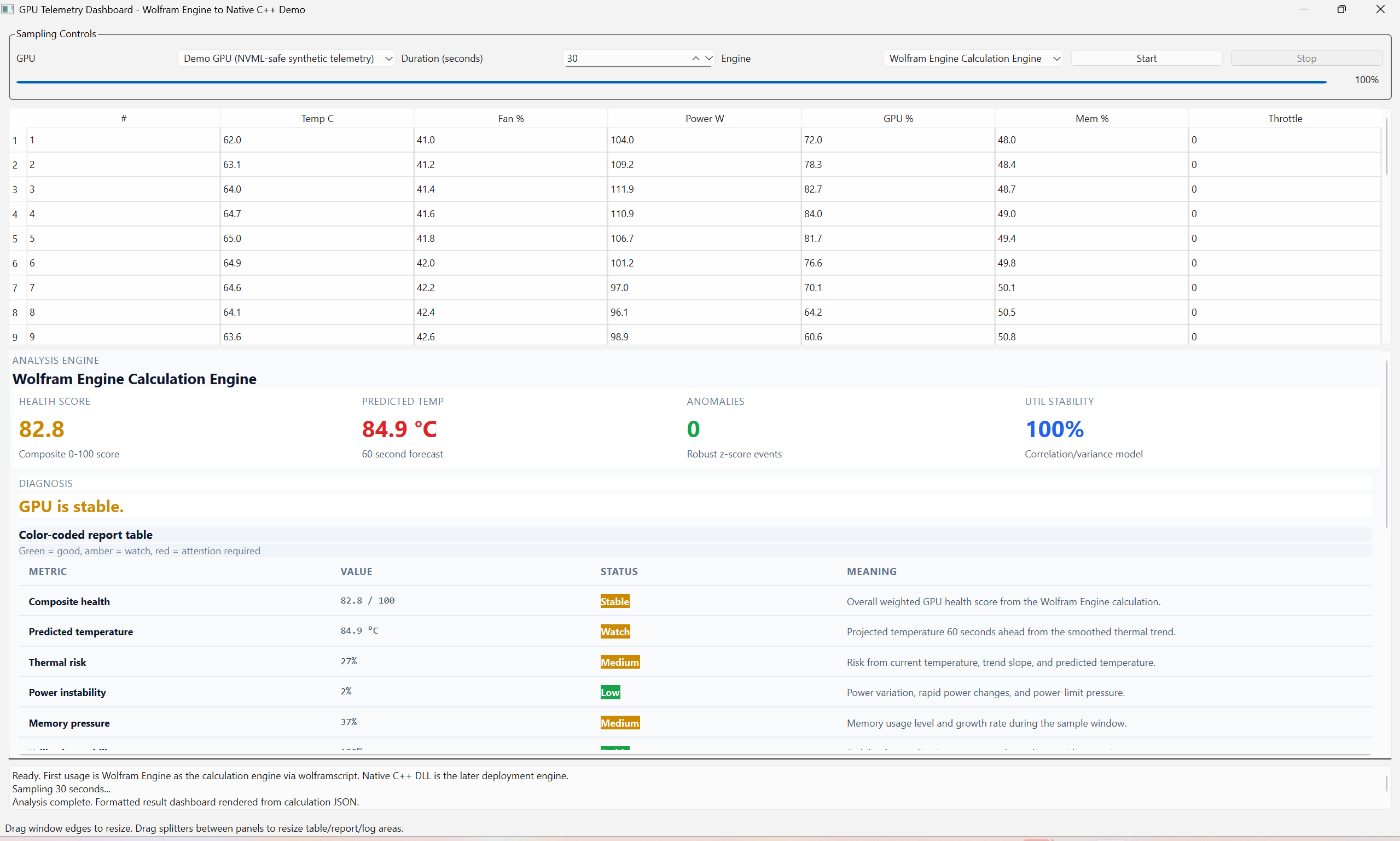
Qt dashboard screenshot with Wolfram Engine calculation report
3. KPI cardsHealth score, predicted temperature, anomaly count and utilization stability.
5. Status logShows sampling progress, selected engine and report rendering messages.
Notebook and script model

Notebook, .wl, .m and .wls — what each file does

.nb

GpuHealthReference.nb

Human-facing notebook wrapper: explanation, presentation, exploration. Not the automated runtime target.

.wl

GpuHealthReference.wl

The reusable Wolfram Language calculation source: smoothing, regression, correlations, anomaly detection and scoring.

.m

GpuHealthPackageExample.m

Traditional Wolfram package file: reusable API layer with exported calculation function, usage messages, contexts and symbolic examples. View source.

.wls

GpuHealthReferenceRunner.wls

Command-line runner: imports telemetry JSON, loads the .wl source, exports analysis JSON. The package path uses GpuHealthPackageRunner.wls.

For customer automation, we do not run the notebook UI. We run the Wolfram Engine kernel through wolframscript.

When to use each Wolfram file type

Why include a .m package example?

Why .m is useful

  • Package boundary: groups reusable functions under a context such as GpuHealthExample`.
  • Public API: exported functions have usage messages, which helps customer teams understand what is supported.
  • Symbolic helpers: good place for model explanation utilities like sensitivity derivatives and threshold solving.
  • Stable reuse: notebooks, scripts and other Wolfram code can load the same package with Get["file.m"].

Decision guide

  • .nb — use for human exploration, teaching, screenshots and algorithm explanation.
  • .wl — use for plain Wolfram Language source: calculation logic that can be loaded by scripts.
  • .m — use when the code should behave like a package/library with named public functions.
  • .wls — use for command-line automation: parse arguments, call the engine, write output files.

In this demo, .wl is still relevant: it is the plain calculation source loaded by the .wls runner. The .m path is the package/API style alternative, also executed by Wolfram Engine.

Calculation details

What we calculate

Inputs sampled by the dashboard

  • Temperature, fan, power, power limit
  • GPU utilization and memory utilization
  • Total/used memory and clock values
  • Throttle reason flags
  • Timestamps for trend estimation

Outputs from Wolfram Engine

  • Composite health score, 0–100
  • Thermal risk and 60-second temperature forecast
  • Power instability and memory pressure
  • Utilization stability
  • Anomaly count and human diagnosis
Algorithm pipeline

Inside the Wolfram calculation

╭──────────────╮
│ JSON samples │
╰──────┬───────╯
       ▼
╭──────────────────────╮
│ Sort + fill defaults │
╰──────┬───────────────╯
       ▼
╭──────────────────────╮
│ Exponential smoothing│ α = 0.35
╰──────┬───────────────╯
       ▼
╭──────────────────────╮
│ Linear thermal trend │ temperature slope
╰──────┬───────────────╯
       ▼
╭──────────────────────╮
│ Risk components      │ thermal / power / memory / anomaly / throttle
╰──────┬───────────────╯
       ▼
╭──────────────────────╮
│ Composite score      │ weighted 0–100 health
╰──────┬───────────────╯
       ▼
╭──────────────────────╮
│ Diagnosis + JSON     │ rendered by Qt report table
╰──────────────────────╯
Formula view

Key scoring concepts

Smoothing and forecast

smooth[t] = α·value[t] + (1-α)·smooth[t-1] α = 0.35 predictedTemperature60s = currentSmoothedTemp + 60·slope

Wolfram Engine estimates the thermal trend from smoothed temperature values over time.

Composite health

healthScore = 100 × (1 - 0.30·thermalRisk - 0.20·powerInstability - 0.15·memoryPressure - 0.15·anomalyRisk - 0.20·throttleRisk)

The score is clamped to 0–100 and translated into a readable diagnosis.

Report output

What the demo checks and displays

Metric
Value
Status
Meaning
Composite health
82.8 / 100
Stable
Weighted GPU health score from Wolfram Engine.
Predicted temperature
84.9 °C
Watch
60-second thermal forecast from smoothed slope.
Thermal risk
27%
Medium
Current temperature, trend and forecast risk.
Power instability
2%
Low
Variation and rapid power changes.
Memory pressure
37%
Medium
Memory utilization and growth behavior.
Utilization stability
100%
Stable
Variance/correlation based stability model.
Anomaly events
0
Clear
Robust z-score outliers across key metrics.
Why Wolfram Engine?

Why use Wolfram Engine as the calculation engine?

Keep mathematics in a math engine

  • Use one environment for symbolic, numeric and statistical analysis.
  • Keep formulas readable for engineers, analysts and customer reviewers.
  • Change scoring logic quickly without rebuilding a custom math stack.

Wolfram Engine is local and automatable

  • Symbolic algebra, calculus, equation solving and optimization.
  • Statistics, time-series analysis, fitting, transforms and anomaly exploration.
  • Run locally through wolframscript, then return clean JSON to the dashboard.

The demo keeps mathematical reasoning in Wolfram Engine, where symbolic and high-level numeric capabilities already exist.

Symbolic + numeric examples

Examples that are natural in Wolfram Engine

Symbolic model work

Get["GpuHealthPackageExample.m"] GpuHealthExample`ScoreSensitivityRules[] D[100 (1 - a thermal - b power - c memory), thermal] Solve[predictedTemp == 90, seconds] FullSimplify[scoreFormula, assumptions]

Useful when engineers want to derive sensitivities, solve threshold equations, or explain formulas — not only execute fixed numeric code.

High-level analytics

TimeSeriesModelFit[tempSeries] FindAnomalies[powerSeries] Correlation[utilization, temperature]

Wolfram Language lets the demo grow from simple scoring to richer diagnostics while staying inside Wolfram Engine.

Validation

How we prove the release works

Engine check

wolframscript.exe -code '$Version'

Confirms the customer's Wolfram Engine is installed, licensed and accessible.

Wolfram path

GpuTelemetryDashboard.exe --wolfram-engine-self-test

Runs built-in samples through Wolfram Engine and validates analysis JSON.

--self-test remains available as a short alias for the same Wolfram Engine validation path.

End-to-end story

The demo message

For the customer

  • Install Wolfram Engine locally.
  • Run an engineering dashboard.
  • See Wolfram calculations inside a customer-style product UI.
  • Validate everything with packaged self-tests.

For ESL and Wolfram

  • Demonstrate a practical licensing and install path.
  • Show how Wolfram Engine powers a local dashboard workflow.
  • Explain why a dedicated calculation engine is the right place for advanced math.
  • Provide an MIT public demo customers can inspect and extend.
← Swipe to navigate →
1 / 19